
Purchasing Constructor for Schools licenses
Purchase paid licenses for Constructor for Schools applications as follows:
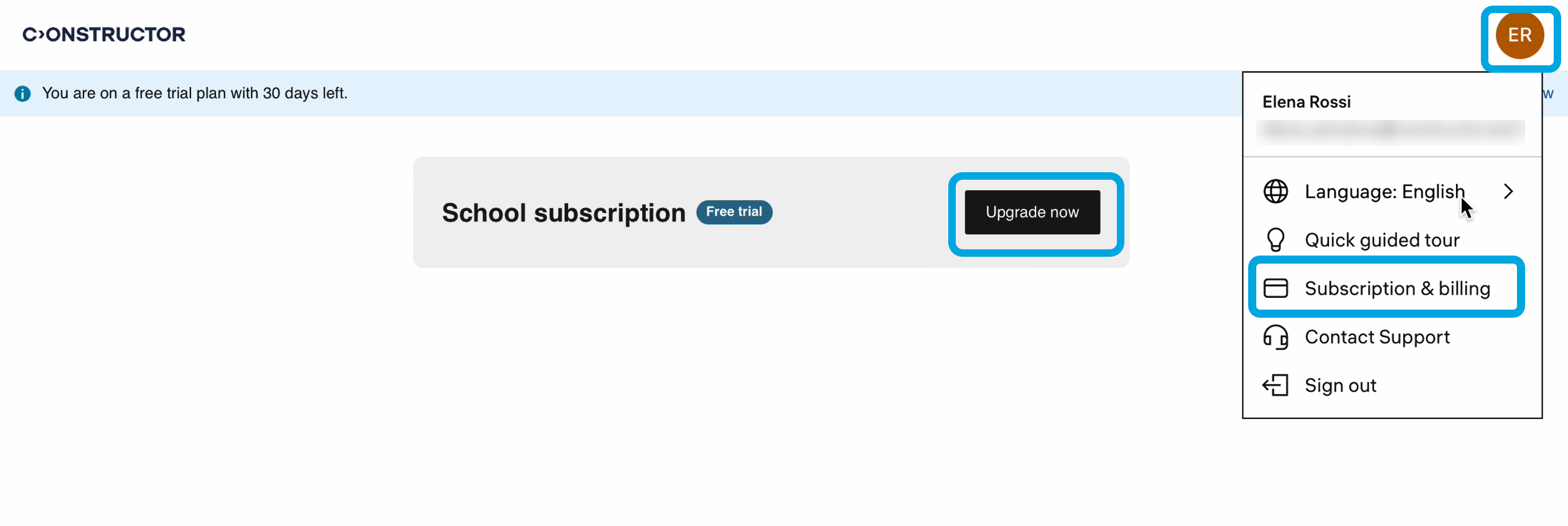
- Click your profile icon in the upper-right corner to open the menu.
- Click Subscription and billing.
- Click Upgrade now.
- Select the plan you want to purchase. By default, the system suggests extending your trial licenses.
| Information | You can adjust the number of licenses for the selected plan by adding or removing them as needed. |
- Click Continue.
- Specify the billing details:
- Official school name — the official name of the school for which you’re purchasing the licenses.
- VAT number — school’s Value Added Tax number.
- Contact person — the school’s contact person for this purchase.
- Billing email — the email address to send the invoice.
- Country — the country where the school is located.
- City — the city where the school is located.
- ZIP code — the postal code of the school.
- Country code — the numeric code of the school’s country.
- Phone number — the phone number of the contact person at the school.
- Payment method — select the appropriate payment method, if necessary, specify the details.
- Check the purchase details, review the Terms of Use, Privacy Policy, and Data Processing Agreement, then check the agreement box. Click Buy now.
You will receive the order confirmation to the specified email address.