
Configuring content flow
The Content Flow feature allows you to configure the sequence in which parts of a course should be taken by learners. The content flow sequence is set by gates which are rules defining the conditions for a learner to get access to the next part of a course. If the gate conditions for the next part are met in the current part of the course that the learner is taking (for example, a practical task is successfully passed with a certain score), the learner gets access to the next part of the course.
Gates with passing scores are not applied to course activities that do not require a score, such as videos to watch or text to read. In such cases, the gate configuration fields are disabled.
To configure the content flow in a composition:
- In the Learn management portal, click
 in the upper-left corner.
 - Go to Authoring > Content libraries.
- Click Compositions.
- Click the required composition to open it.
- In the leftmost bar, click the Content flow icon
 to switch to the Content flow configuration tab.
 - Configure the content flow as follows:
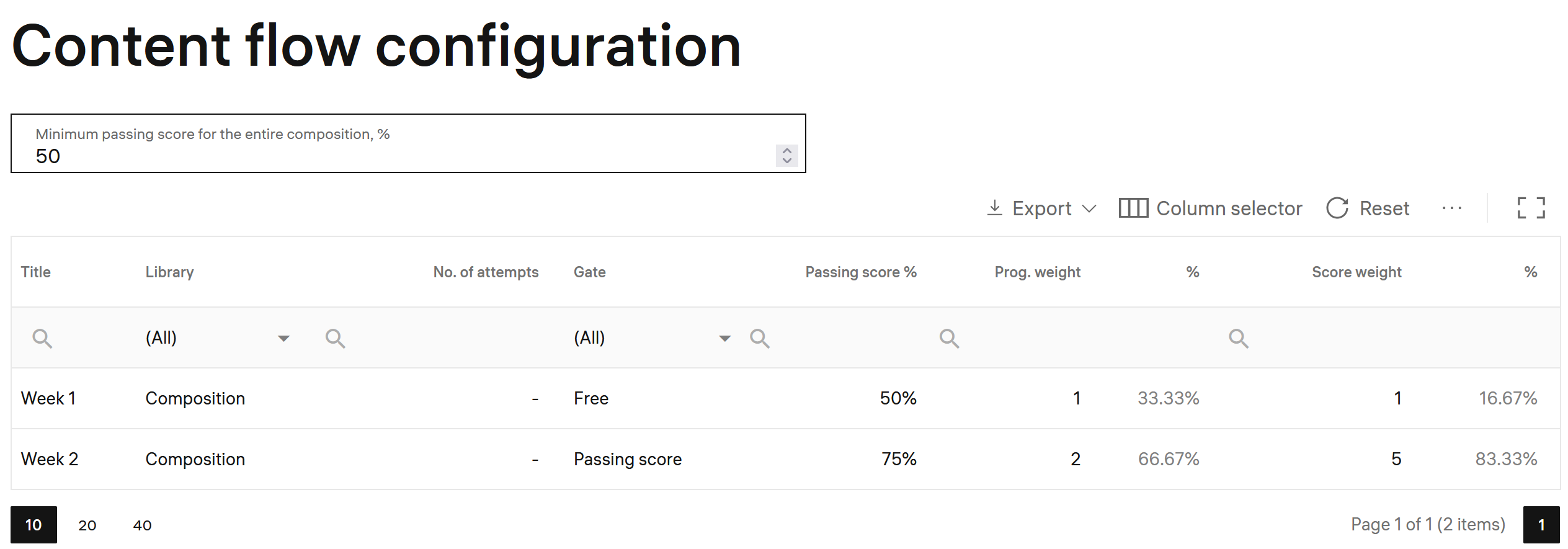
- Minimum passing score for the entire composition — the minimum score learners must gain for the composition to be marked as successfully passed. This value will be applied to all courses (or other compositions) in which this composition is included.
This setting is involved into defining the content flow when the composition is included into other compositions (courses). If there is a gate requiring passing this composition before getting access to the next part of a course, the next part will be available only after a learner passes this composition with a score not lower than this minimum passing score.
In the table columns, specify the following:
- Number of attempts — the number of attempts a learner has to complete an activity of the composition.
Note: For text-only activities this setting cannot be defined because they do not contain components for assessing.
- Gate — the rule condition for learners to get access to the next activity:
- Free — a learner gets access to the next activity after they complete the current activity, regardless of the score received for the current activity. + Passing score — a learner gets access to the next activity if they complete the current activity with the passing score specified in the respective Passing score field.
- Passing score — the score required to mark the activity as successfully passed. The default value is the value specified for the activity (composition) in its settings as Minimum passing score for the entire composition. You can change it for the content flow you configure.
Together with Gate set to Passing score, this setting means that a learner needs to pass the activity with a score not lower than the passing score to get access to the next activity.
If Gate is set to Free, a learner can get access to the next activity with any score for this activity. But this activity will not be marked as passed if it receives a score lower than the passing score.
Note: Passing score can be set to 0. In this case, if Gate is set to Passing score, this means that a learner needs to at least start this activity to get access to the next activity.
- Duration — estimated time for learners to complete the the estimated time for learners to complete the activity. Indicating this time helps learners better plan their progression through the course.
- Prog. weight — the weight of the activity in the total progress calculation for the whole composition. The default value is 1.
This setting reflexes the volume (for example, the time taken in minutes) the activity passing takes in relation to passing the whole composition (course), how it affects the whole composition (course) progress.
Note: If you change progress weight values when editing the earlier configured settings, the values in the system are synchronized and recalculated once in a certain period (the default value is 30 minutes). It is done for a more effective resource usage.
- % — this value defines the progress weight as a percentage. It is calculated automatically by dividing the activity progress weight by the sum of all activities progress weights and multiplying by 100.
- Score weight — a score weight in arbitrary points. The default value is 1.
This setting reflexes the importance of passing the activity. The higher the score, the more important passing the activity is. For example, the score weight for passing a final quiz is greater than the score weight for reading an introductory text (which can be 0).
- % — this value defines the score weight as a percentage. It is calculated automatically by dividing the activity score weight in points by the sum of score weights of all activities in points and multiplying by 100.
Note: The passing scores configured in Content flow are applied to the activities of the composition, unless the option to apply the passing score configured in the grading scale is selected in the Grading scale settings.
- Optional — this flag defines whether the activity is mandatory (clear the check box) or optional (select the check box).
- Collaborative — this flag defines whether the activity is recommended for learners to work together in mini-groups. In this case, a learners group will be split in mini-groups, each of which should work on the activity collaboratively.
Note: In the Content flow configuration, the Collaborative flag indicates that the activity is recommended to be collaborative. Instructors can remove the flag if they want learners to work on the activity individually.
Example
See also Configuring content flow for individual activities.