
Introduction
Constructor Learn interface overview
The general view of the Constructor Learn author interface is shown in the screenshot below.
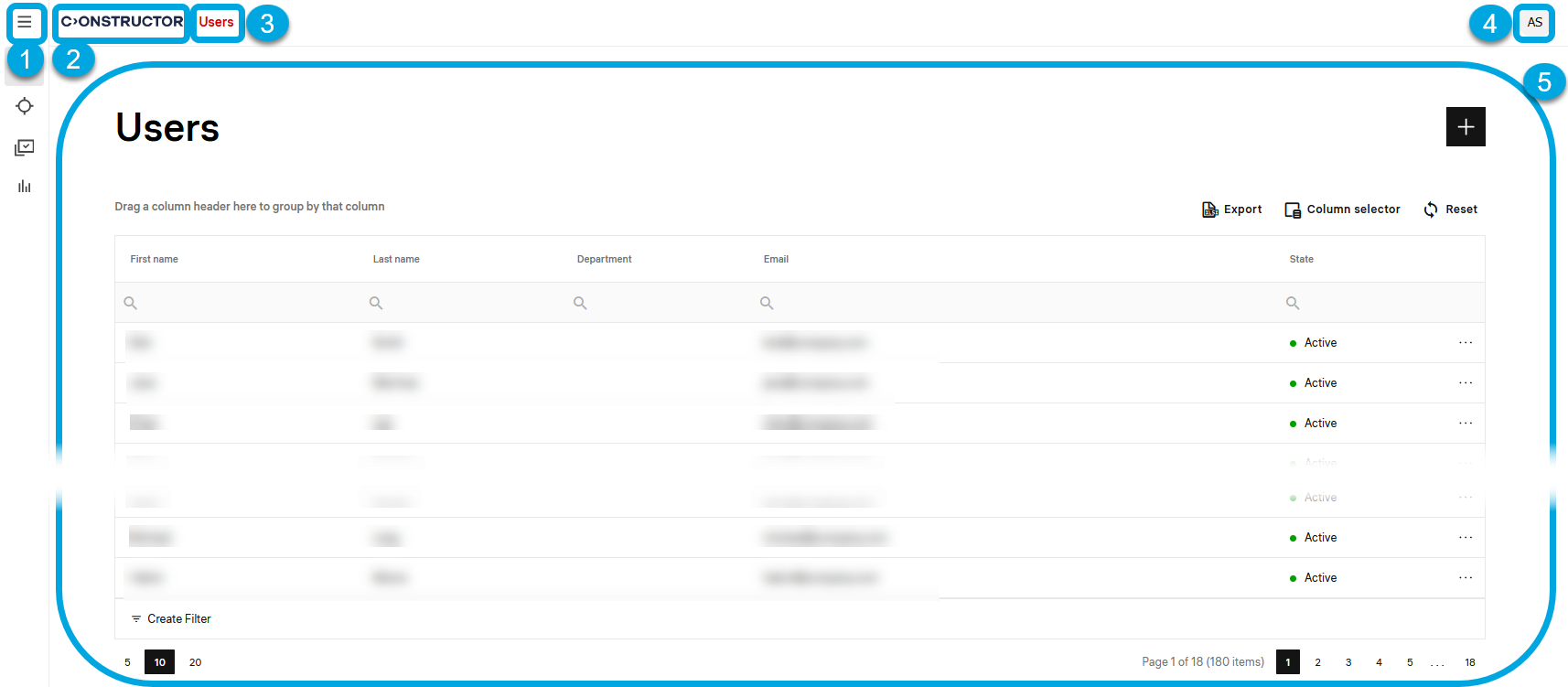
According to the numbers in the screenshot, the Constructor Learn UI has these main parts:
- 1 — the main menu
 for managing online courses that includes these sections:
- Users and groups — a menu section for creating and managing learners and learner groups that take online courses in Constructor Learn.
- Teaching — a menu section for creating or editing objectives, assigning objectives to learners (or groups of learners), tracking progress details, and the tool to assess submitted objectives.
- Authoring — a menu section that contains tools for creating and managing content of various types
- Reports — a menu section with reports and the tool for custom reports creation to analyze learners' progress, behavior, and other aspects of the educational process.
- 2 — the logo; clicking the logo returns you to the home page.
- 3 — the navigation element and breadcrumbs area; clicking this element returns you to the previous page.
- 4 — the user profile menu in which you can set the interface language.
- 5 — the content of a menu opened at the moment.